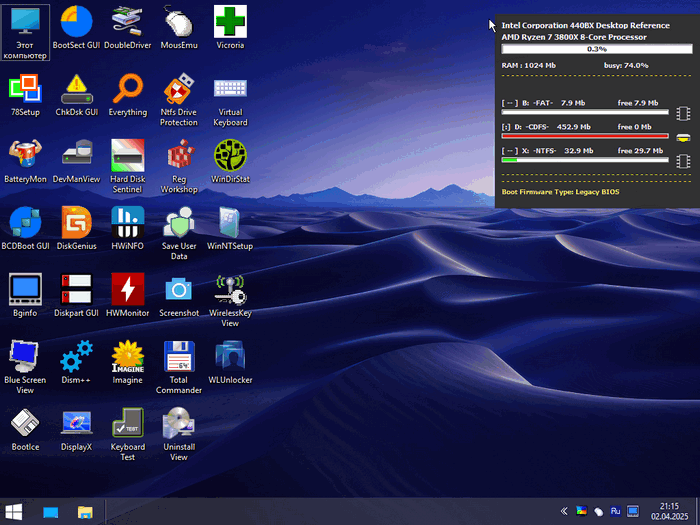
Windows 11 PE 26200.7171 Compact [02.07.2026] – Lightweight Bootable Recovery Environment Based on Windows 11 25H2
Windows 11 PE 26200.7171 Compact [02.07.2026] is a lightweight bootable Windows Preinstallation Environment designed for maintenance, diagnostics, system recovery, file management, and emergency repair tasks. Unlike a full Windows 11 installation, this edition is built to run directly from a USB drive or external boot media, giving users access to essential tools without needing to boot into the main operating system installed on the computer.
This compact PE build is based on Windows 11 25H2 build 26200.7171, offering a modern Windows 11 foundation in a reduced and portable format. It is mainly intended for technicians, advanced users, system administrators, and anyone who needs a reliable rescue environment for troubleshooting damaged or unbootable PCs.
What Is Windows 11 PE Compact?
Windows PE, short for Windows Preinstallation Environment, is a minimal version of Windows used for deployment, recovery, and repair operations. It is not designed to replace a normal desktop operating system. Instead, it provides a temporary working environment that can be launched from bootable media.
Windows 11 PE Compact focuses on being smaller, faster, and easier to load than heavier rescue systems. Because of its compact nature, it is suitable for USB flash drives and quick emergency use. Users can boot into the environment, access disks, recover files, fix boot issues, manage partitions, and perform basic maintenance even when the installed Windows system is damaged.
Main Purpose
The main purpose of Windows 11 PE 26200.7171 Compact is to provide a practical rescue toolkit for situations where the main operating system cannot start normally. It can be used for system recovery, hardware checks, password reset operations, bootloader repair, backup tasks, driver management, and file transfer.
This makes it especially useful after system crashes, failed updates, boot errors, malware damage, corrupted partitions, or accidental file deletion. Instead of reinstalling Windows immediately, users can boot into Windows PE and attempt to repair or recover important data first.
Key Features
Windows 11 PE 26200.7171 Compact includes the essential advantages expected from a modern PE environment. It offers a Windows 11-based interface, support for 64-bit systems, quick boot performance, and compatibility with many modern computers.
One of its biggest strengths is portability. The environment can be placed on a USB drive and used across different machines. This is very helpful for IT technicians who need one tool for multiple systems.
Another important feature is access to offline Windows installations. When the main Windows system cannot boot, Windows PE can still access internal drives, allowing users to copy files, inspect folders, repair system components, or prepare the computer for a clean installation.
Common Uses
Windows 11 PE Compact can be used in many repair and maintenance scenarios. The most common use is recovering files from a computer that no longer boots. Users can connect an external drive, boot into the PE environment, and copy personal documents, images, videos, or work files before reinstalling or repairing Windows.
It can also be used for installing operating systems. Since it provides a bootable Windows-based workspace, users can prepare disks, launch setup files, or deploy system images.
Another common use is boot repair. If Windows fails to start because of damaged boot records or missing boot files, Windows PE can help users access recovery tools and rebuild boot configuration data.
For advanced users, it can also be useful for partition management, disk cloning, backup creation, driver backup, system inspection, and offline registry or file editing.
Performance and Compact Design
The compact design is one of the most important parts of this release. A lighter PE environment usually means faster loading times and lower memory usage. This is especially useful on older computers, low-resource systems, or machines with slow USB ports.
Because it does not include all the features of a complete Windows installation, Windows 11 PE Compact is more focused and efficient. It gives users the tools needed for repair and maintenance without unnecessary background services or heavy components.
However, the compact structure also means that some normal Windows features may be missing. It should not be expected to behave like a full Windows 11 desktop system. It is a temporary rescue environment, not a daily-use operating system.
Interface and Usability
Since this PE build is based on Windows 11, the interface feels familiar to users who already use modern Windows versions. This makes it easier to navigate compared with command-line-only recovery tools.
The familiar Windows-style desktop helps users access drives, open tools, manage files, and perform repair tasks without needing deep technical knowledge. Still, some operations, such as boot repair, password reset, or partition editing, require caution because incorrect changes can cause data loss.
Advantages
Windows 11 PE 26200.7171 Compact offers several advantages. It is portable, lightweight, and useful in emergency situations. It can help recover files from broken systems, repair boot problems, and prepare computers for Windows installation.
Its compact size makes it convenient for USB rescue drives. It can be carried by technicians and used whenever a computer refuses to boot. It also provides a safer way to access files before making major repair decisions.
Another advantage is that it runs independently from the installed operating system. Even if Windows is corrupted, infected, or unable to start, the PE environment can still load from external media.
Limitations
Despite its usefulness, Windows 11 PE Compact has limitations. It is not a full operating system and should not be used as a permanent Windows replacement. Some applications may not run correctly, certain drivers may be missing, and features such as personalization, long-term updates, Microsoft Store functions, or full desktop services are usually not available.
Users should also be careful when using unofficial PE builds. Since many PE releases are customized by third-party creators, it is important to use trusted sources, scan files when possible, and avoid using unknown builds on sensitive systems.
Another limitation is hardware compatibility. Although Windows 11-based PE environments usually support many modern devices, some storage controllers, network adapters, or special hardware may require additional drivers.
Who Should Use It?
Windows 11 PE 26200.7171 Compact is best suited for advanced users, repair technicians, IT support workers, and users who frequently troubleshoot Windows systems. It is also useful for anyone who wants to keep an emergency recovery USB drive ready.
Normal users can also benefit from it, especially for file recovery and basic repair tasks, but they should avoid advanced tools unless they understand what they are doing. Operations such as formatting partitions, modifying boot records, or resetting passwords should be handled carefully.
Safety Notes
Before using any PE environment, users should make sure they understand the purpose of the tool. It is recommended to back up important data before making changes to disks or system partitions. When working with unknown or damaged drives, file recovery should always come before formatting or reinstalling Windows.
Users should also avoid downloading modified Windows environments from untrusted websites. A bootable rescue system has deep access to the computer, so security is important. It is better to verify file integrity when checksums are available and scan the ISO file before use.
Final Verdict
Windows 11 PE 26200.7171 Compact [02.07.2026] is a practical and lightweight rescue environment built for Windows maintenance, recovery, and troubleshooting. It provides a portable Windows 11-based workspace that can help users access files, repair boot problems, manage disks, install operating systems, and diagnose PC issues.
Its compact size and emergency-focused design make it a useful tool for technicians and advanced users. While it is not a replacement for a full Windows installation, it can be extremely valuable when a system fails to boot or when quick recovery work is needed.
For users who often repair computers or want a reliable bootable rescue solution, Windows 11 PE 26200.7171 Compact can be a helpful addition to a USB toolkit, provided it is used carefully and obtained from a trustworthy source.