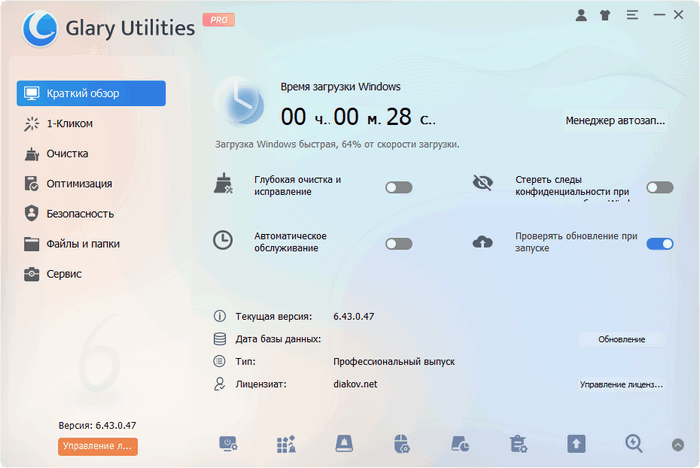
Glary Utilities is a suite of system tweaks and utilities for fine-tuning, improving performance, and protecting your PC. It removes junk files, obsolete registry entries, and internet history. Glary Utilities lets you manage (and even remove) various modules used to enhance browser functionality, analyze disk space efficiency, and search for existing copies of specific files. Furthermore, Glary Utilities optimizes system memory usage, finds, fixes, or removes broken shortcuts, edits the list of programs that load with the operating system, and uninstalls specified applications. It also supports searching for empty directories and permanently deleting files.

Set of utilities:
- Disk Cleaner – Removes unwanted data from your drives and recovers disk space.
- Registry Cleaner – Registry cleaning, scanning and cleaning to improve system performance.
- Shortcuts Fixer – Fixes shortcut errors in menus and on the desktop.
- Uninstall Manager – Completely uninstalls programs that you no longer need.
- Startup Manager – Manages startup programs.
- Memory Optimizer – Checks and optimizes memory in the background.
- Context Menu Manager – Manages context menu items for files and folders…
- Erase Traces – Erases all traces of your internet activity: events, cookies, internet history…
- File Shredder – Erases files permanently without the possibility of recovery.
- File Undelete – A fast and effective way to recover accidentally deleted files.
- File Encrypter and Decrypter – Protects your files from unauthorized access and use.
- Disk Analyzer – Shows disk space occupied by files and folders.
- Find Duplicate Files – Finds and removes duplicate and empty folders.
- File Splitter and Joiner – Splits large files into smaller ones for management, then reassembles.
- Process Manager – Monitors programs running on your computer and blocks spyware and Trojans.
- Internet Explorer Assistant – Manages Internet Explorer add-ons.
- Windows Standard Tools – Provides direct access to useful settings for default window functions.
Type: Install | Unpack (portable version from PortableAppZ).
Languages: ML.
Removed: English help.
Activation: Completed.
Command line switches:
• Silent installation of the regular version: /S /I
• Unpacking the portable version: /S /P
• It is also possible to select the installation directory: After all the switches, you must add /D=%path% Example: installation_file.exe /S /I /D=C:\Program
Optimized
– Memory Defragmenter: Improved clipboard clearing algorithm, increased speed by 5%.
– Free Space Wipe: Improved algorithm, increased speed by 8%.
– Minor interface improvements.
Fixed
– Minor bugs fixed.