Fly Photos 2.6.5: A Fast, Lightweight Photo Viewer for Modern Windows
Introduction
Fly Photos 2.6.5 is a fast and lightweight photo viewer for Windows, designed for users who want a smooth, clean, and responsive way to browse images without relying on heavy photo management software. The program is inspired by the classic Google Picasa Photo Viewer experience, but it brings that idea into a more modern Windows environment with updated visuals, better performance, smooth animations, and support for many popular image formats.
For users who regularly browse large photo folders, RAW images, screenshots, design files, or mixed image collections, Fly Photos offers a simple but powerful viewing experience. It focuses on speed, smooth navigation, high-quality zooming, and a distraction-free interface, making it a practical choice for photographers, designers, content creators, and everyday Windows users.
Version 2.6.5 improves the overall zoom experience, adds better image scaling, optimizes startup performance, and fixes several issues that affected smoothness and stability.
What Is Fly Photos?
Fly Photos is a modern photo viewer for Windows that aims to replace slow or outdated image viewers with a faster and more elegant solution. Instead of being a full photo editor or complex media organizer, Fly Photos focuses on doing one main job very well: opening and browsing photos quickly.
The program is built for users who want instant startup, smooth transitions, clean viewing, and easy navigation through folders containing many images. It supports common image formats and several advanced formats, making it suitable for both casual users and professionals.
Fly Photos is especially useful for people who miss the simplicity and speed of Picasa Photo Viewer. It offers a similar lightweight viewing concept while using modern Windows technologies and interface effects.
What’s New in Fly Photos 2.6.5?
Fly Photos 2.6.5 focuses mainly on better zoom quality, smoother zoom animation, improved performance, and better stability.
One of the most important changes in this version is the addition of Anisotropic image scaling. This scaling method helps provide sharper and smoother image quality compared with simpler scaling methods, while still keeping the viewer fast and responsive.
The update also replaces live off-screen rendering with a 3-level mip map system. This improves zoom animation and helps make image movement feel smoother, especially when zooming in and out.
Startup performance has also been improved, which means the application should open faster and feel more responsive when launching.
Fly Photos 2.6.5 also includes Nvidia-specific zoom optimizations. These improvements are useful for users with Nvidia graphics hardware and can help improve the zooming experience on supported systems.
In addition, this version fixes an invisible crash that could happen when closing the application while the backdrop was set to Mica or Acrylic. It also fixes an issue where the zoom animation could end with a small subpixel snap, making the final zoom position feel less smooth.
Main Features
Fast and Lightweight Performance
The biggest advantage of Fly Photos is speed. The program is designed to open quickly and browse images smoothly, even inside folders that contain a large number of photos.
This makes it useful for photographers and users who often work with big image collections. Instead of waiting for a heavy application to load, Fly Photos provides a faster way to open and view images immediately.
Its lightweight design also makes it suitable for everyday use. Users who simply want to open a photo, zoom in, rotate it, check details, and move to the next image can do that without dealing with unnecessary tools or complicated menus.
Picasa-Inspired Viewing Experience
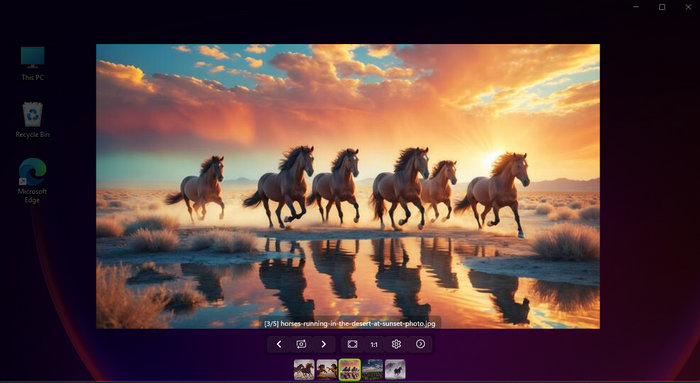
Fly Photos is inspired by the old Picasa Photo Viewer, which many users loved because of its simple full-screen viewing style and transparent background effect.
The program brings back that comfortable viewing experience in a modern way. It allows users to browse images in a clean interface that keeps the focus on the photo itself rather than on toolbars or distracting panels.
This makes Fly Photos a good option for users who want a minimal photo viewer that feels elegant and familiar.
Smooth Zooming and Navigation
Fly Photos 2.6.5 improves zoom quality and zoom animation, making the viewing experience smoother than before. Users can zoom into images, inspect details, move around the picture, and return to a full view with fluid motion.
The program supports multiple input methods, including mouse, keyboard, touchpad gestures, and touch controls. This gives users more flexibility depending on the device they are using.
For example, users can navigate between photos with arrow keys, zoom using the mouse wheel or keyboard shortcuts, and use touchpad gestures for a more natural browsing experience.
Wide Image Format Support
Fly Photos supports many common image formats through Windows Imaging Component, including popular formats such as JPEG, PNG, TIFF, and RAW formats supported by the system.
It also includes extended support for several modern and advanced formats, including PSD, HEIC, HEIF, SVG, GIF, APNG, animated WebP, and AVIF.
This wide format support makes Fly Photos useful for different types of users. Photographers can browse RAW files, designers can preview PSD and SVG files, and general users can open everyday photos and screenshots easily.
Modern Windows Interface
Fly Photos is designed for modern Windows systems and supports stylish visual effects such as Mica, Acrylic, and Frozen Glass. These interface options give the viewer a more polished and modern look while keeping the photo as the main focus.
The interface is clean and simple. It does not overload the user with unnecessary buttons, but it still provides useful controls for zooming, rotating, navigating, sharing, opening files in external apps, and viewing file properties.
The program also supports multi-monitor use and can remember the last used monitor, which is helpful for users who work with more than one display.
Thumbnail Strip
Fly Photos includes a thumbnail strip that allows users to browse images visually and jump quickly to a specific photo. The thumbnail size can be adjusted, making it easier to navigate through large folders.
This feature is especially useful when browsing photo sessions, screenshots, wallpapers, design exports, or any collection where visual selection is faster than file-name browsing.
Touch, Mouse, and Keyboard Controls
Fly Photos offers flexible controls for different types of users. Keyboard users can move between images, zoom, rotate, enter full-screen mode, show file properties, copy images to the clipboard, delete files, and open external apps using shortcuts.
Mouse users can drag to pan, use the wheel to zoom or navigate, use mouse buttons to move between images, and access context menus easily.
Touchscreen and touchpad users can use gestures such as pinch-to-zoom and two-finger navigation. This makes the program comfortable to use on laptops, tablets, and modern Windows devices.
Explorer Integration
Fly Photos integrates well with Windows Explorer. Users can open images directly from the right-click menu, choose Fly Photos as an “Open with” option, or set it as the default image viewer for specific file types.
The program also follows Explorer sorting and filtering behavior, which helps keep the viewing experience consistent with the way files are arranged in Windows.
External App Support
Fly Photos allows users to open images in external applications. This is useful when the user wants to quickly move from viewing to editing.
For example, a user can browse images in Fly Photos and then open a selected image in a professional editor such as Photoshop, GIMP, Paint.NET, or another preferred application.
This makes Fly Photos useful as a fast first-viewing tool before editing or organizing images elsewhere.
Safe Viewing Experience
Fly Photos is mainly a viewer, not a heavy editor. This means it is useful for users who want to inspect images without accidentally changing the original files.
The program focuses on opening, displaying, navigating, zooming, rotating for viewing, and managing access to files. This makes it suitable for users who want a safe and simple photo browsing environment.
Known Limitations
Although Fly Photos is powerful as a fast image viewer, it is not a full photo editing program. Users who need advanced editing tools such as layers, color grading, retouching, masking, batch editing, or professional export controls will still need dedicated editing software.
The program also has some technical limitations. SVG rendering may be limited in size, HDR support is not fully implemented, and very large images may not display correctly on all hardware due to DirectX texture limitations.
These limitations are understandable because Fly Photos is designed mainly for fast viewing rather than advanced editing or professional image processing.
System Compatibility
Fly Photos is designed for modern Windows systems. It is best suited for Windows 10 and Windows 11 users who want a fast, clean, and modern image viewer.
Older 1.x versions were available for Windows 7 and Windows 8, but modern 2.x releases focus on newer Windows environments and are better matched with current Windows visual technologies and performance features.
Who Should Use Fly Photos?
Fly Photos is a good choice for photographers who need to browse large photo folders quickly. It is also useful for designers who want to preview different image formats without opening a full editing program.
Content creators can use it to browse screenshots, thumbnails, social media graphics, exported images, and project folders quickly. General users can also benefit from it as a faster and cleaner replacement for the default Windows photo viewer.
It is especially suitable for users who liked Picasa Photo Viewer and want a similar experience on modern Windows.
Advantages
Fly Photos 2.6.5 is fast, lightweight, clean, and easy to use. It opens quickly, supports many image formats, provides smooth zooming, and includes modern Windows visual effects.
The improved zoom quality in version 2.6.5 makes image inspection more comfortable, while startup optimizations make the program feel more responsive. The support for mouse, keyboard, touchpad, and touch controls also makes it flexible for different devices and workflows.
Another major advantage is its simplicity. Fly Photos does not try to become a complicated editor. Instead, it focuses on being a fast and enjoyable photo viewer.
Disadvantages
Fly Photos is not designed for advanced editing, so users who need professional image manipulation tools will need another application. It also may not support every advanced imaging workflow, especially HDR or extremely large images on limited hardware.
Some users may also prefer a complete photo organizer with albums, tags, cloud syncing, facial recognition, and editing tools. Fly Photos is more focused on fast local viewing than full library management.
Final Verdict
Fly Photos 2.6.5 is an excellent lightweight photo viewer for Windows users who want speed, simplicity, and smooth image browsing. It is a modern alternative for people who miss the classic Picasa Photo Viewer style but want better compatibility with current Windows systems and modern image formats.
This version improves one of the most important parts of the viewing experience: zooming. With better scaling, smoother animations, startup optimizations, Nvidia-specific improvements, and important bug fixes, Fly Photos 2.6.5 feels more polished and reliable.
For users who need a fast, clean, and modern image viewer without unnecessary complexity, Fly Photos 2.6.5 is a strong choice.