Fly Photos 2.6.2: A Fast and Modern Photo Viewer for Windows
Fly Photos 2.6.2 is a lightweight and modern photo viewer designed for Windows users who want a fast, simple, and elegant way to browse images. It is built as a modern alternative to the classic Google Picasa Photo Viewer, which many users still remember for its speed, clean design, and smooth photo browsing experience.
Instead of focusing on heavy editing tools or complicated photo management systems, Fly Photos focuses on one main goal: opening and viewing images quickly. This makes it a useful choice for users who want a clean image viewer that starts fast, handles large image collections smoothly, and keeps the viewing experience simple.
What Is Fly Photos 2.6.2?
Fly Photos 2.6.2 is a free and open-source image viewer for Windows. It is designed to give users a smooth and responsive photo viewing experience without the heavy interface found in many modern photo applications.
The program is inspired by Picasa Photo Viewer, one of the most popular image viewers from the past. Since Picasa was discontinued, many users have searched for a similar tool that feels fast, clean, and easy to use. Fly Photos tries to fill that gap by offering a modern Windows photo viewer with fast loading, smooth navigation, and a distraction-free interface.
Main Purpose of the Program
The main purpose of Fly Photos is to help users view images quickly and comfortably. Many photo applications include large libraries, cloud services, AI tools, editing panels, and account-based features. While those tools may be useful for some users, they can also make the application slower and more complicated.
Fly Photos takes a different approach. It focuses on speed, simplicity, and direct image viewing. Users can open a photo, move between images, zoom in, rotate pictures, and browse through folders without dealing with unnecessary distractions.
This makes Fly Photos ideal for people who simply want a fast image viewer for daily use.
User Interface and Design
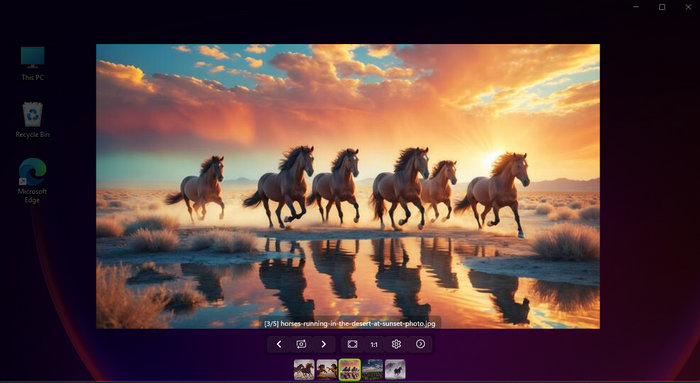
Fly Photos 2.6.2 comes with a clean and modern interface. The design is simple, stylish, and easy to understand. It does not overload the screen with too many buttons or menus. Instead, it keeps the photo as the main focus.
The interface is suitable for both casual users and people who browse large numbers of images regularly. The viewer feels lightweight, and the layout makes it easy to navigate between photos without losing focus.
Its design is especially useful for users who prefer the old Picasa-style viewing experience but want something that looks more modern on Windows 10 and Windows 11.
Fast Image Loading
One of the strongest features of Fly Photos 2.6.2 is speed. The program is designed to open images quickly, even when working with large files or big folders.
Fast image loading is important for photographers, designers, bloggers, students, and anyone who needs to check many images in a short time. Instead of waiting for a heavy photo application to load, users can open images almost instantly and move from one picture to another smoothly.
This makes Fly Photos a practical tool for reviewing screenshots, wallpapers, camera photos, downloaded images, and project assets.
Smooth Photo Browsing
Fly Photos is not only fast when opening images; it also provides smooth browsing between photos. Users can move through image folders easily and preview multiple files without unnecessary delays.
This is useful when checking large photo collections or comparing different images. The smooth navigation helps users save time and makes the viewing experience more enjoyable.
For users who miss the speed and simplicity of Picasa Photo Viewer, this feature is one of the main reasons to try Fly Photos.
Zooming and Rotation Tools
Fly Photos 2.6.2 includes basic tools for viewing images more comfortably. Users can zoom in to inspect details, zoom out to see the full picture, and rotate images when needed.
These tools are simple but important. They make the program useful for checking image quality, reading text in screenshots, reviewing design elements, or correcting the viewing angle of a photo.
The goal is not to replace professional editing software, but to provide the essential viewing controls users need every day.
Support for Modern Windows
Fly Photos is built for modern Windows systems. It uses modern Windows technologies to provide a smoother experience, better performance, and a more updated interface.
This makes it different from older image viewers that may feel outdated or poorly integrated with current versions of Windows. Fly Photos is designed to feel natural on Windows 10 and Windows 11 while keeping the lightweight spirit of classic photo viewers.
Open-Source Advantage
One of the important advantages of Fly Photos is that it is open-source. This means the project is publicly available, and users or developers can inspect, follow, and contribute to its development.
Open-source software often appeals to users who prefer transparency, community-driven development, and free tools without unnecessary restrictions. It also gives the program a stronger sense of trust compared to unknown closed-source utilities.
Lightweight Performance
Fly Photos 2.6.2 is designed to be lightweight. It does not try to become a full photo editing suite or a complex media organizer. This helps keep the program fast and efficient.
A lightweight photo viewer is especially useful on older computers, laptops, and systems where users do not want heavy software consuming too many resources. It is also useful for people who need a secondary image viewer that opens quickly when double-clicking image files.
A Modern Alternative to Picasa Photo Viewer
Many users loved Picasa Photo Viewer because it was fast, simple, and visually pleasant. After Google discontinued Picasa, Windows users had to search for alternatives. Some image viewers are powerful but complicated, while others are simple but outdated.
Fly Photos aims to provide a modern replacement for that classic experience. It keeps the focus on fast viewing, smooth transitions, and clean design, while using modern Windows technologies.
For users who want something similar to Picasa Photo Viewer but updated for today’s systems, Fly Photos 2.6.2 is a strong option.
Who Should Use Fly Photos 2.6.2?
Fly Photos is suitable for many types of users.
It is useful for casual users who want a simple photo viewer for everyday images. It is also helpful for photographers who need to browse large folders quickly. Designers can use it to preview visual assets, while bloggers and content creators can use it to check screenshots, thumbnails, and edited images.
It is also a good choice for users who dislike slow or overloaded photo apps and prefer a clean viewer that does exactly what they need.
Advantages of Fly Photos 2.6.2
Fly Photos 2.6.2 offers several advantages. It is fast, lightweight, modern, and easy to use. The interface is clean and focused on the image itself. The program is also free and open-source, which makes it accessible to everyone.
Another major advantage is its Picasa-inspired experience. Users who miss the old Google Picasa Photo Viewer may find Fly Photos familiar and comfortable.
The program also works well as a daily image viewer because it does not require complicated setup or advanced knowledge.
Disadvantages of Fly Photos 2.6.2
Although Fly Photos is a very good photo viewer, it is not designed to be a complete photo editing program. Users who need advanced editing tools, color correction, layers, batch processing, or professional retouching will still need software such as Photoshop, Lightroom, GIMP, or other advanced editors.
It is also mainly focused on Windows, so users on macOS or Linux may need different alternatives. In addition, users who want a full photo library manager with tagging, albums, cloud sync, and advanced organization tools may find Fly Photos too simple for that purpose.
Fly Photos vs Windows Photos
Windows already includes a default Photos app, but not all users are satisfied with it. Some users find it slower than expected, while others prefer a simpler and faster image viewer.
Fly Photos can be a good alternative for users who want faster opening, smoother browsing, and fewer distractions. It does not try to replace every feature of Windows Photos, but it can offer a better experience for users who care mainly about quick viewing.
Fly Photos vs Professional Photo Editors
It is important to understand that Fly Photos is not a professional editor. It is a viewer. That means its strength is in opening, displaying, zooming, rotating, and browsing images quickly.
Professional tools are better for editing and creative work, but they are often heavier and slower for simple viewing. Fly Photos is useful because it fills the gap between basic viewing and heavy editing software.
Installation and Usage
Installing Fly Photos 2.6.2 is usually simple. After installation, users can open images directly with the program and browse through photos in the same folder. It can be used as a regular photo viewer for everyday image files.
The program is suitable for users who want a quick replacement for their default image viewer. Once installed, it can become part of the normal Windows workflow for opening and checking images.
Final Verdict
Fly Photos 2.6.2 is a fast, clean, and modern photo viewer for Windows. It is especially useful for users who miss the simplicity and speed of Picasa Photo Viewer and want a modern alternative that works well on current Windows systems.
The program focuses on what matters most in a photo viewer: speed, smooth browsing, lightweight performance, and a distraction-free interface. It does not try to compete with advanced photo editors, and that is part of its strength. Instead, it gives users a simple and efficient way to view images without unnecessary complexity.
Overall, Fly Photos 2.6.2 is a recommended choice for anyone looking for a free, open-source, and fast image viewer for Windows.