FluentCleaner 26.06.03: A Modern Open-Source Cleaner for Windows
FluentCleaner 26.06.03 is a modern Windows cleaning utility designed for users who want a simple, transparent, and lightweight way to remove unnecessary files from their computers. Inspired by the classic idea of PC cleanup tools, FluentCleaner focuses on cleaning junk files without adding unnecessary features, ads, scareware warnings, or complicated optimization tricks.
The program is built with a modern WinUI 3 interface, making it feel more native to Windows 10 and Windows 11. Instead of overwhelming users with aggressive system tweaks, FluentCleaner keeps its purpose clear: scan for temporary files, cache, logs, and other leftover clutter, then allow the user to review and clean them safely.
What Is FluentCleaner?
FluentCleaner is an open-source desktop cleaner for Windows. It is designed to help users free up storage space by detecting files that are usually safe to remove, such as temporary data, browser cache, application leftovers, log files, and other forms of system junk.
Unlike many traditional PC cleaners, FluentCleaner avoids unnecessary registry-cleaning claims and does not try to sell extra services. Its approach is based on transparency and simplicity. Users can see what is being scanned, review the results, and choose what they want to delete.
Modern Windows Design
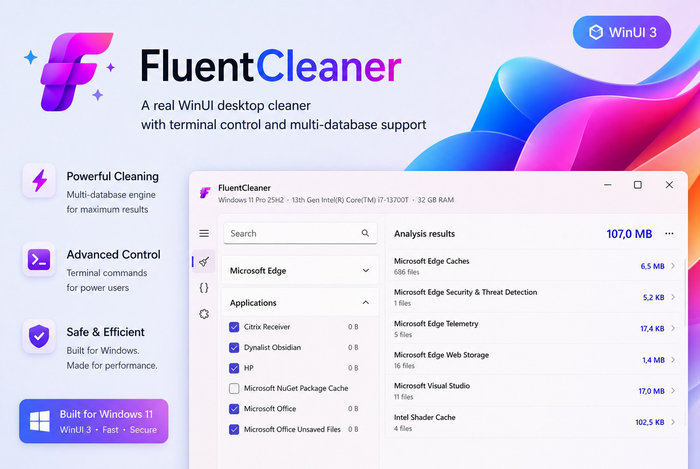
One of the strongest points of FluentCleaner is its clean and modern interface. The program uses WinUI 3, giving it a design that matches the look and feel of recent Windows versions. The layout is simple, organized, and easy to understand, even for users who are not familiar with advanced maintenance tools.
The interface separates cleaning categories clearly, allowing users to understand what type of data they are dealing with. This makes the cleaning process safer and more controlled compared to tools that hide too much behind a single “optimize” button.
Main Features of FluentCleaner 26.06.03
FluentCleaner offers a focused set of features built around practical system cleanup. It can scan Windows and installed applications for unnecessary files, display results in a clear way, and help users remove unwanted clutter.
The program supports database-based cleaning, including compatibility with Winapp2-style cleaning definitions. This allows it to recognize more applications and cleaning locations, making it useful for users who want broader cleaning coverage.
FluentCleaner also includes category-based cleaning, which helps users decide exactly what they want to remove. Instead of deleting everything automatically, it gives users better control over the process.
Lightweight and Portable Experience
FluentCleaner is designed to be lightweight and easy to use. It does not require complicated setup steps, and it can be used as a practical maintenance tool whenever the system starts to collect unnecessary files.
Because the program is not packed with ads, browser add-ons, or background services, it feels clean and direct. This makes it a good option for users who want a simple cleaner without turning their PC maintenance software into another source of clutter.
Safer Cleaning Philosophy
A key advantage of FluentCleaner is its careful cleaning philosophy. The program focuses on files that are clearly unnecessary, such as cache, temporary files, and leftover logs. It avoids dangerous or exaggerated “one-click repair” ideas that may cause more harm than good.
This makes FluentCleaner suitable for users who want to clean their system without risking important settings or damaging Windows components. However, as with any cleaning tool, users should always review scan results before deleting files, especially when dealing with browser data or application caches.
Performance and Usability
FluentCleaner is fast, responsive, and simple to operate. The scanning process is designed to help users quickly identify where storage space can be recovered. Results can be reviewed by category, making it easier to decide what should be cleaned and what should be kept.
For everyday users, FluentCleaner can help remove unnecessary files and keep the system more organized. For advanced users, support for custom cleaning rules and database-based entries adds extra flexibility.
Who Should Use FluentCleaner?
FluentCleaner is a good choice for Windows users who want a free and transparent alternative to traditional system cleaners. It is especially useful for people who prefer open-source software, modern design, and a cleaner without ads or unnecessary bundled features.
It is also suitable for users who regularly download files, browse heavily, install and uninstall programs, or work with applications that generate temporary data. Over time, these files can take up valuable storage space, and FluentCleaner helps remove them in a controlled way.
Pros and Cons
Pros
FluentCleaner has a modern WinUI 3 interface, open-source development, lightweight performance, and a clear focus on real junk files. It avoids scareware tactics, unwanted upsells, and aggressive registry-cleaning features. It also gives users control over what they want to clean.
Cons
The program may not include every advanced optimization feature found in larger commercial tools. Some users may also need time to understand database-based cleaners or custom cleaning entries. Since it is still a relatively new project, future versions may continue to refine and expand its feature set.
Conclusion
FluentCleaner 26.06.03 is a promising modern cleaner for Windows users who want a simple, honest, and lightweight tool for removing unnecessary files. With its clean WinUI 3 design, open-source nature, and focused cleaning approach, it offers a refreshing alternative to bloated PC maintenance software.
For anyone looking for a cleaner that focuses on transparency, performance, and user control, FluentCleaner is a strong option worth trying. It does not try to be a full system optimizer; instead, it does one important job clearly and efficiently: helping users remove junk files from Windows.