Fixyfier 7.4.0: Complete Review, Features, Windows Repair Tools, and System Maintenance Overview
Fixyfier 7.4.0 is a Windows repair and maintenance tool designed to help users diagnose, fix, clean, and optimize common system problems from one simple interface. Instead of forcing users to search through many different Windows settings, command-line tools, troubleshooters, and maintenance options, Fixyfier brings many useful repair functions together in one place.
The program is made for both everyday users and more experienced PC users who want a faster way to handle common Windows problems. It can help with system repair, temporary file cleanup, network fixes, Windows Update issues, Microsoft Store problems, service repairs, diagnostics, and general maintenance tasks.
What Is Fixyfier 7.4.0?
Fixyfier 7.4.0 is a free Windows utility that focuses on repairing and maintaining Windows systems. It is not a traditional antivirus, full system optimizer, or professional recovery suite. Instead, it works as a practical toolkit that centralizes many common Windows repair and cleanup actions.
The software is useful when a computer starts behaving strangely, showing errors, running into update problems, facing network issues, or suffering from temporary file clutter. By organizing repair tools in a clear interface, Fixyfier helps users solve problems without needing deep technical knowledge.
Main Purpose of Fixyfier
The main purpose of Fixyfier is to make Windows troubleshooting easier. Many Windows repair tasks require users to open Command Prompt, run system commands, reset services, clear caches, check system files, or use built-in troubleshooters. These steps can be confusing for normal users.
Fixyfier simplifies this process by offering access to repair and maintenance actions through buttons and organized categories. This makes Windows maintenance more accessible and reduces the need to manually remember complicated commands.
User Interface and Ease of Use
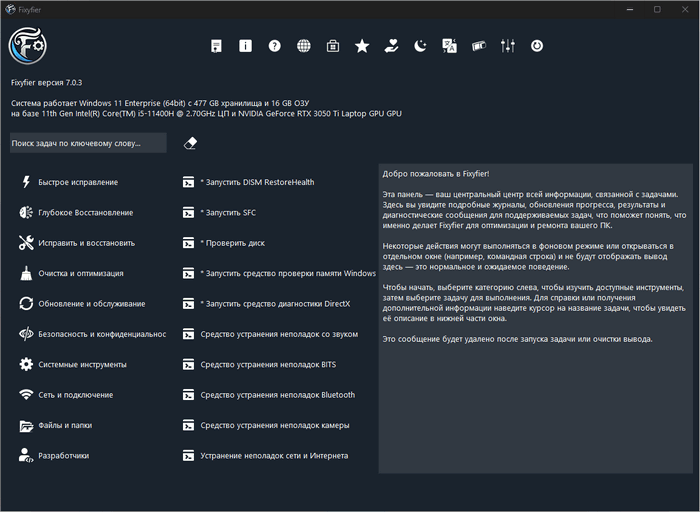
Fixyfier 7.4.0 is designed with simplicity in mind. The interface is straightforward and focuses on function rather than complicated visual effects. Users can choose repair, cleanup, optimization, diagnostic, and maintenance tools from the available sections.
This simple structure makes the program suitable for users who do not want to waste time searching through Windows settings. It also makes the tool useful for technicians who want quick access to common repair functions.
The program is especially helpful because it allows users to perform maintenance tasks without needing to type commands manually.
Windows Repair Tools
One of the strongest parts of Fixyfier 7.4.0 is its Windows repair functionality. The tool can help users run important system repair processes that are often used to fix corrupted files, unstable system behavior, and common Windows errors.
These repair tools may include system file checking, component repair, disk checking, and other maintenance processes based on built-in Windows utilities. This is useful when Windows files are damaged, system components are not working correctly, or the computer becomes unstable.
For users who are not comfortable using the command line, Fixyfier provides a much easier way to start these repair actions.
Cleanup and Optimization
Fixyfier also includes cleanup tools that help remove unnecessary temporary files and system clutter. Temporary files can build up over time and consume disk space. Cleaning them can help keep the system organized and may improve normal daily performance.
The program may also help clear caches such as DNS cache, remove user temporary files, and launch Windows cleanup functions. These actions are not magic performance boosters, but they can help keep the computer cleaner and more consistent.
Fixyfier’s approach is realistic because it focuses on maintenance and stability rather than making exaggerated speed promises.
Network and Internet Fixes
Network issues are common on Windows computers. Users may face DNS problems, connection drops, slow browsing, or general internet instability. Fixyfier includes tools that can help diagnose and resolve some of these problems.
Network repair actions may include resetting network settings, flushing DNS cache, refreshing connection components, or running related Windows repair commands. These tools can be useful when internet problems are caused by local Windows configuration issues.
For home users, this can save time compared to manually searching for each network repair method.
Windows Update and Microsoft Store Repair
Windows Update and Microsoft Store problems are among the most frustrating issues for many users. Updates may fail to install, downloads may get stuck, or Store apps may stop working correctly.
Fixyfier can help users access repair functions related to Windows Update, Microsoft Store, and related services. These tools may assist in resetting components, repairing background services, or clearing problematic caches.
This makes Fixyfier useful when normal Windows troubleshooting does not solve the problem quickly.
System Diagnostics
Fixyfier 7.4.0 also includes diagnostic functions that help users understand system problems. Diagnostics are important because not every issue can be solved by cleaning files or running a repair command.
The program may help users check system information, view logs, run memory diagnostics, inspect hardware-related information, or collect useful details about the computer. These features can help users or technicians identify whether a problem is related to software, drivers, hardware, services, or corrupted system files.
Privacy and Security-Related Maintenance
Fixyfier includes some tools related to privacy and security maintenance. These may help users clear certain traces, manage unnecessary data, or improve basic system hygiene.
However, it is important to understand that Fixyfier is not a replacement for antivirus software, firewall protection, malware scanning, or professional security tools. Its purpose is system repair and maintenance, not malware removal.
Users should still keep Windows Security or another trusted antivirus solution enabled.
One-Click Repair Concept
One of the attractive ideas behind Fixyfier is the ability to start several common maintenance actions quickly. Some users like the idea of pressing one button to perform basic cleanup and repair tasks.
However, users should understand that no tool can truly “fix everything” automatically. Windows problems can have many causes, including corrupted files, broken drivers, hardware failure, malware, bad updates, or damaged user profiles.
Fixyfier can be very useful for common issues, but it should be used as a repair assistant, not as a guaranteed solution for every possible Windows problem.
Built-In Windows Tools Made Easier
A major advantage of Fixyfier is that many of its repair functions are based on trusted Windows tools and maintenance methods. This is important because it means the program does not need to rely on risky or aggressive system modifications.
Instead of changing sensitive settings without explanation, Fixyfier focuses on practical repair actions that Windows users and technicians commonly use. This makes the tool safer and more understandable than many aggressive “PC booster” applications.
Who Should Use Fixyfier 7.4.0?
Fixyfier 7.4.0 is suitable for many types of users.
Home users can use it to solve basic Windows problems and clean unnecessary files.
Students can use it to maintain laptops and fix common connectivity or update issues.
Office users can use it to keep work computers running smoothly.
Technicians can use it as a quick-access repair toolkit.
Power users can use it to save time when running common system commands.
The program is especially useful for people who want repair tools in one place without dealing with complicated manual steps.
Advantages of Fixyfier 7.4.0
Fixyfier 7.4.0 offers several advantages. It is free, easy to use, and focused on common Windows repair tasks. It brings many troubleshooting tools into one interface, making system maintenance faster and more accessible.
It can help with temporary file cleanup, system file repair, Windows Update problems, network issues, Microsoft Store problems, diagnostics, and basic optimization. It is also useful for users who do not feel comfortable using Command Prompt.
Another advantage is that Fixyfier does not rely on unrealistic claims. Its goal is to keep Windows cleaner, more stable, and easier to repair.
Disadvantages of Fixyfier 7.4.0
Although Fixyfier is useful, it is not a complete solution for every Windows problem. It cannot repair damaged hardware, remove all malware, fix every driver issue, or guarantee major speed improvements.
Some advanced repair actions may still require technical knowledge. Users should read options carefully before running advanced tools, especially if they are not sure what a function does.
Also, because it is a maintenance and repair tool, users should always create a restore point or backup important data before performing major system repairs.
Fixyfier vs Traditional PC Optimizers
Many PC optimizer programs promise dramatic speed boosts, but some of them use aggressive cleaning methods or exaggerated marketing. Fixyfier is different because it focuses more on repair, cleanup, diagnostics, and maintenance rather than unrealistic performance promises.
It is better understood as a Windows repair toolkit, not as a magic speed booster. This makes it more practical and more honest for users who want real maintenance tools.
Fixyfier vs Manual Windows Commands
Advanced users can run many Windows repair commands manually, such as system file checks, disk checks, component repairs, network resets, and cleanup commands. However, this requires knowledge of Command Prompt, PowerShell, and Windows troubleshooting steps.
Fixyfier makes these tasks easier by placing them inside a graphical interface. This saves time and makes the process less intimidating for beginners.
Safety Tips Before Using Fixyfier
Before using any repair or maintenance tool, users should follow basic safety steps. It is recommended to save important work, back up important files, and create a Windows restore point. Users should also avoid running advanced repair options unless they understand what they do.
Fixyfier is designed to simplify repair tasks, but responsible use is still important. System maintenance tools should always be used carefully.
Best Use Cases for Fixyfier 7.4.0
Fixyfier is most useful in situations such as:
Windows Update not working correctly
Microsoft Store apps failing to open or update
Temporary files taking up disk space
Network or DNS problems
Windows services not behaving normally
System files possibly being corrupted
General computer instability
Need for quick diagnostics
Basic cleanup after long-term system use
In these cases, Fixyfier can help users start the right repair steps quickly.
Final Verdict
Fixyfier 7.4.0 is a useful and practical Windows repair toolkit for users who want to diagnose, clean, and fix common system problems from one place. It is not a magic optimizer and should not be treated as a replacement for antivirus software, professional diagnostics, or hardware repair. However, it can save time and make Windows maintenance much easier.
Its biggest strength is simplicity. By combining common repair tools, cleanup functions, network fixes, diagnostics, and maintenance options into one interface, Fixyfier helps users solve everyday Windows problems without needing advanced technical knowledge.
Overall, Fixyfier 7.4.0 is a recommended tool for Windows users who want a simple, free, and practical way to maintain system stability and handle common repair tasks more efficiently.