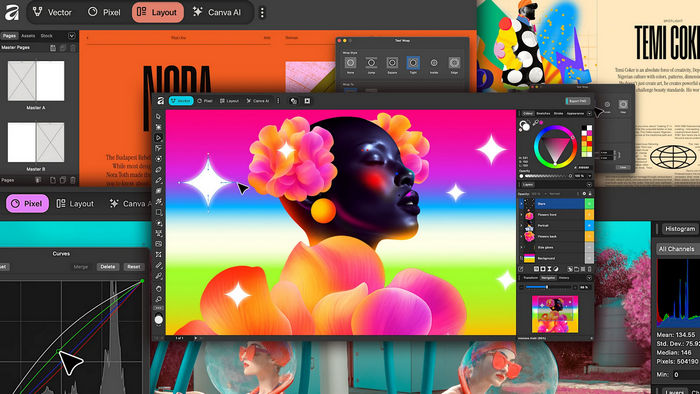
Canva Affinity 3.2.2.4557: Full Review, Features, and Complete Overview
Canva Affinity 3.2.2.4557 is a modern professional design application created for users who need powerful tools for photo editing, vector design, digital illustration, and page layout in one unified workspace. After Canva acquired Affinity, the software evolved from separate applications into a single creative platform that combines the core power of Affinity Photo, Affinity Designer, and Affinity Publisher.
This version continues the new direction of Affinity as an all-in-one creative solution for designers, photographers, publishers, content creators, marketers, and digital artists. Instead of switching between multiple programs, users can work on image editing, vector graphics, typography, print layouts, and digital designs inside one integrated environment.
What Is Canva Affinity?
Canva Affinity is the new unified version of the Affinity creative suite. Previously, Affinity was known for three separate apps: Affinity Photo for image editing, Affinity Designer for vector graphics, and Affinity Publisher for page layout. The new Canva Affinity brings these tools together into one application, making the workflow faster, cleaner, and more flexible.
The software is designed to compete with professional creative tools while remaining easier to access. It offers advanced design features, strong performance, modern editing tools, and compatibility with many professional file types.
Main Purpose of Canva Affinity 3.2.2.4557
The main purpose of Canva Affinity 3.2.2.4557 is to provide a complete creative workspace for professional and personal design projects. Users can create social media graphics, posters, brochures, logos, business cards, digital illustrations, photo edits, marketing materials, magazines, books, presentations, and web assets.
It is especially useful for users who want professional-level tools without needing to depend on multiple separate applications. The unified interface makes it easier to move between different types of creative work while keeping the same project open.
Key Features of Canva Affinity 3.2.2.4557
1. Unified Creative Workspace
One of the most important features of Canva Affinity is its unified workspace. Instead of using separate apps for photo editing, vector drawing, and publishing, users can access all these tools in one place.
This makes the workflow smoother and more efficient. A designer can edit an image, create vector elements, adjust typography, and prepare a print layout without leaving the same application.
2. Professional Photo Editing Tools
Canva Affinity includes powerful photo editing features suitable for photographers, retouchers, and digital artists. Users can adjust colors, correct exposure, work with layers, apply masks, use filters, enhance details, and perform non-destructive edits.
The application is suitable for both quick image improvements and advanced photo manipulation. It gives users more control over image quality, color balance, sharpening, contrast, and fine details.
3. Vector Design and Illustration
The vector tools in Canva Affinity allow users to create clean, scalable graphics such as logos, icons, illustrations, UI elements, posters, and branding assets. Vector graphics are important because they can be resized without losing quality.
Version 3.2 introduced new vector-focused features such as Vector Blob and Vector Erase tools. These tools make it easier to create filled vector shapes and edit vector artwork more naturally.
4. Page Layout and Publishing Tools
Canva Affinity also includes professional page layout tools. These are useful for creating magazines, books, brochures, catalogs, reports, flyers, menus, and other print or digital publishing projects.
Users can work with text frames, image placement, master pages, typography controls, OpenType features, custom bullets, and multi-page documents. This makes the software suitable for both designers and publishers.
5. Texture Filter for Image Enhancement
One of the important additions in the Affinity 3.2 series is the Texture Filter. This feature helps enhance fine surface details in images without making the result look overly harsh or artificial.
It is useful for improving skin texture, product photos, landscapes, materials, and detailed images where the user wants more clarity while keeping a natural appearance.
6. Improved RAW Image Processing
Canva Affinity 3.2 includes improvements for RAW image processing. This is useful for photographers who work with camera RAW files and need more control over exposure, highlights, shadows, color correction, masks, and fine adjustments.
Better RAW processing allows users to create cleaner and more professional results before moving into deeper editing stages.
7. Advanced Masking Options
The software includes powerful masking tools that help users isolate specific areas of an image or design. These tools are important for professional editing because they allow selective adjustments without affecting the entire project.
Users can work with different types of masks to control color, brightness, object selection, and image blending more accurately.
8. Canva Integration
Because Affinity is now part of Canva, users can benefit from better integration with Canva’s ecosystem. This can help creators move between professional desktop design and Canva’s online design platform more easily.
For users who already use Canva for branding, social media, templates, or team collaboration, this integration can improve productivity and make the design process more connected.
9. Canva AI Features for Premium Users
Canva Affinity includes access to some Canva AI-powered tools for users with a paid Canva subscription. These tools may include AI image generation, background removal, object cleanup, smart editing, and other AI-assisted creative options.
The core Affinity experience remains focused on professional manual design tools, while AI features provide extra convenience for users who want faster creative workflows.
10. Better Compatibility With Professional Workflows
Canva Affinity supports professional workflows across design, photography, publishing, and digital production. It can handle many common file formats used by creative professionals, making it easier to exchange work with clients, teams, and other applications.
Affinity 3.2 also improved integration with external creative workflows, including support related to DaVinci Resolve, allowing Affinity files to be used in video production workflows such as title cards, annotations, and overlays.
What’s New in the 3.2 Series?
The Canva Affinity 3.2 series introduced several important improvements, including:
- New Texture Filter for image detail enhancement
- New Fine Detail sharpening option
- New Vector Blob tool
- New Vector Erase tool
- Improved RAW image processing
- Better masking options
- Better OpenType support
- Custom image bullet support for layout work
- Improved compatibility with DaVinci Resolve workflows
- Better integration with Canva Brand Kits for paid Canva users
- General performance and stability improvements
These changes make the software more powerful for photographers, illustrators, designers, and layout artists.
Why Use Canva Affinity 3.2.2.4557?
Canva Affinity 3.2.2.4557 is a strong choice for users who want professional design tools in one application. It is useful for freelancers, agencies, social media creators, photographers, students, print designers, and small businesses.
The biggest advantage is that it combines several creative workflows into one environment. This saves time, reduces the need for multiple apps, and makes the creative process more organized.
Advantages
Canva Affinity 3.2.2.4557 offers many advantages, including:
- All-in-one design, photo, and publishing workspace
- Professional photo editing tools
- Strong vector design features
- Advanced page layout options
- Useful texture and sharpening improvements
- Better RAW image editing
- Canva ecosystem integration
- Clean and modern creative workflow
- Suitable for both beginners and professionals
- Good alternative to traditional subscription-based design suites
Possible Disadvantages
Although Canva Affinity is powerful, it may still require learning time for new users. Professional design tools can feel complex at first, especially for users who are only familiar with simple online editors.
Some Canva AI features may also require a paid Canva subscription, so users who want the full AI-powered experience may need to connect their Canva account and subscribe to Canva’s premium services.
Another point to consider is that users coming from older standalone Affinity apps may need time to adapt to the new unified interface.
Who Is Canva Affinity Best For?
Canva Affinity 3.2.2.4557 is best for:
- Graphic designers
- Logo designers
- Photographers
- Digital artists
- Social media creators
- Print designers
- Publishers
- Marketing teams
- Freelancers
- Small business owners
- Students and creative learners
It is a flexible tool that can handle many types of projects, from simple online graphics to complex professional design work.
Final Verdict
Canva Affinity 3.2.2.4557 is a powerful all-in-one creative application that brings together photo editing, vector design, and page layout tools in a single workspace. It represents a major step forward for the Affinity platform under Canva, making professional design tools more accessible and easier to use.
The 3.2 series adds valuable improvements such as the Texture Filter, Vector Blob, Vector Erase, better RAW processing, improved masking tools, and enhanced creative workflow support. These features make the software suitable for both everyday design tasks and advanced professional projects.
Overall, Canva Affinity 3.2.2.4557 is an excellent choice for users who want a modern, flexible, and professional creative platform without needing to rely on multiple separate applications.